
A visitor arrives at your office and asks for the Wi-Fi password. Your receptionist points them to the guest network, and they are connected within seconds.
It seems straightforward. Your staff use one network, visitors use another, and each has a different password.
But there is an important question: can someone connected to your guest Wi-Fi reach your business devices?
A different Wi-Fi name and password do not, by themselves, guarantee that visitors are separated from your computers, servers, printers or security systems. That protection depends on how the network has been configured.
At Managed Services Australia, we help businesses build secure, reliable networks that make connecting easy while keeping access under control.
What Does Separate Guest Wi-Fi Actually Mean?
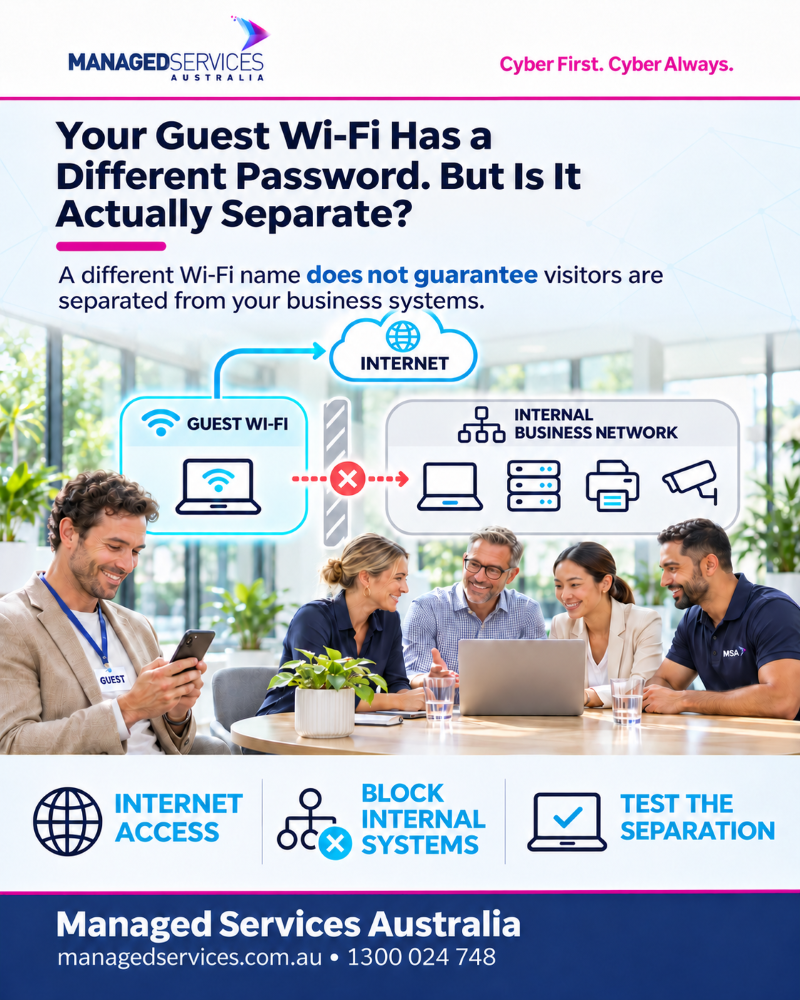
Guest Wi-Fi should give visitors access to the internet without giving them access to your internal business systems.
Think of it like welcoming someone into your reception area. They can sit down, attend their meeting and use the facilities you provide. That does not mean they should also have access to the filing room or the keys to every office.
The same principle applies to your network.
A properly configured guest connection should generally allow visitors to:
- Browse the internet.
- Access their email.
- Join online meetings.
- Use their own cloud applications.
It should prevent them from reaching internal resources such as shared business files, server connections and equipment management pages.
The goal is simple: provide the connection visitors need, with clear limits on what they can access.
A Different Network Name Is Only the Beginning
You may see two Wi-Fi options in your office: one for staff and another labelled “Guest”.
That is a useful starting point, but the names alone do not tell you what happens behind the scenes.
Depending on the setup, both connections could still lead to the same internal network. A guest device might be able to discover an office printer, connect to another device or reach a system that was intended only for staff.
Reaching a device does not automatically mean someone can open its files or sign into it. Passwords and other protections still matter. However, unnecessary access creates opportunities that a properly separated guest network should remove.
Your IT provider should be able to confirm that the separation is working, rather than relying on the Wi-Fi name as evidence.
Why Does This Matter for Your Business?
Visitors are not necessarily a security threat. The concern is that your business has little control over the devices they bring with them.
A visitor’s laptop or phone may be missing updates, running unsafe software or already affected by malware without its owner knowing.
Connecting that device should not give it an easy path towards sensitive business systems.
Network separation helps limit where a problem can spread. The Australian Signals Directorate recommends dividing networks into sections and controlling access between them to help protect sensitive systems and restrict attacker movement.
For a business, that means creating sensible boundaries around the systems that matter.
It Is Not Just About Visitors
Most workplaces now have far more connected equipment than laptops and desktop computers.
Your network may also support:
- Security cameras and access control systems.
- Printers and scanners.
- Meeting room screens and conferencing equipment.
- Staff members’ personal phones.
- Smart televisions and other connected devices.
These devices have different purposes and different access requirements.
A security camera, for example, may need to communicate with its recording system. It would not normally need access to your accounting computer.
Your network should reflect those differences. Depending on your business, it may be sensible to separate staff devices, visitors, security equipment and critical systems, then allow only the connections required for them to work.
This does not mean every device needs its own network. It means making deliberate decisions about what should be able to communicate.
How Is Guest Wi-Fi Kept Separate?
Your IT provider may use terms such as “network segmentation”, “VLANs” and “firewall rules”.
The practical idea is easier to understand than the terminology.
Your equipment creates separate areas within the network. Rules then control which connections are allowed between those areas.
For guest Wi-Fi, the usual aim is to allow internet access while blocking access to internal business systems.
Depending on your requirements, your provider can also:
- Prevent guest devices from communicating directly with one another.
- Limit guest bandwidth to help preserve capacity for business use.
- Set expiry times for visitor access.
- Provide temporary passwords or access vouchers.
- Check that restrictions continue to work after network changes.
A welcome page or voucher system can make access easier to manage, but it does not replace the controls that keep guests separate.
Does Secure Guest Wi-Fi Make Things Harder for Visitors?
It should not.
A visitor should still be able to select the guest network, enter the required details and get online.
Most of the protection happens in the background. Visitors do not need to understand your network design, and staff should not need to share the main business Wi-Fi password.
If visitors need a specific service, such as presenting to a meeting room screen, that access can be planned. Your IT provider can assess how to make it available while maintaining appropriate boundaries.
Good network design supports the way your business works.
Five Questions to Ask Your IT Provider
You do not need to inspect firewall settings yourself. Start with these questions:
- Is our guest Wi-Fi separated from our internal business network?
- Can a guest device reach our servers, printers, cameras or equipment settings?
- Can devices on the guest network communicate with other guests?
- Is guest internet usage managed to help protect business performance?
- When was the separation last tested?
A clear answer should explain what is allowed, what is blocked and how that has been checked.
If nobody can confirm the setup, it is worth reviewing.
Separate Access. Greater Confidence.
Guest Wi-Fi is a useful service for customers, contractors and visitors. With the right setup, you can offer that convenience while maintaining sensible boundaries around your business technology.
The key is to look beyond the network name and password.
What matters is what a connected device can actually reach.
Strengthen Your Business Technology and Security
Not sure whether your current IT and cyber security setup is providing the protection your business needs?
Managed Services Australia can review your technology environment, identify potential risks and recommend practical improvements that support your team and business goals.
Contact Managed Services Australia to discuss how we can help your business work securely and confidently.
🌐 Explore our services at Managed Services Australia.
📧 Dial 1300 024 748, shoot us an email at [email protected], or schedule a session with one of our IT specialists.